Which technologies will be used
Today Akka offers a great technology stack that is built on top of the Actor paradigm. It delivers a great Akka Stream API which together with a simplified concurrency model and great abilities for use and control backpressure empowers us with top-class tools to create a solid and resilient back-end. Also one should take into account that Akka community supports a promising framework on top of Akka Stream called Alpakka which aims to repeat Apache Camel success but in the context of Akka ecosystem.
What will we create
Today I will walk you through this tutorial which basically covers Akka Actors, Akka HTTP, Akka Streams and Alpakka. We will drive all the mentioned technologies using Java API, but it would be even simpler to make it works in Scala.
The task looks simple enough: we need to create a REST-endpoint using Akka HTTP which accepts a Greeting objects serialized as Json. The request entity then should be passed to the Akka actor which manages some basic processing: it extracts the name and surname field from Greeting and send the related HTTP-response (say we have Greeting with name="Alex" and surname="Sergeenko", so we will get "Hello, Alex Sergeenko" as the response body). This concatenated string also should be passed to another actor, which uses Alpakka to publish the string to some predefined Kafka topic. That’s it.

The project diagram
We will also support a load-balancing for GreeterActor using Akka Router and thus leverage a backpressure mechanism while publishing to Kafka using Akka Stream’s Source.Queue.
In the tutorial you won’t find a lot of theory but practice. If you’re interested to delve deeper into the Akka‘s ecosystem insides then go for the official documentation. It contains everything and even more about the features and approaches presented in the tutorial.
Part I: Creating Actors
The GreeterActor
The basic Akka unit is Actor. Actors can interact with each other by sending asynchronous messages. Therefore each Actor has its own message box, which is unlimited by default. Actors process messages one-by-one (and one at a time). After the message is received an actor can create another actor, send a message to another actor, or shut down (see so-called Poison Pill).
Each actor lives in some ActorSystem. It stands for the hierarchy of actors and can be visualized as a tree, where root actors are parents to the ones closer to the leaves. You should be aware that there are two basic parent nodes that exist in every actor system in Akka: system and user (which together are also known as the guardians). All actors, created by users, become children of user actor. This information seems to be very helpful, especially considering the addressing between actors (we will see it later).

As it comes from the project diagram we should create two actors: the GreeterActor and the KafkaWriterActor. So let’s begin from the beginning!
The GreetingActor (and any other actor) should extend the AbstractActor class. As it comes from the official Akka documentation, AbstractActor is an Actor base class that should be extended to create Java actors.
The createReceive() and preStart() methods of AbstractActor were overridden with our custom implementations. The createReceive() method is more interesting since it contains the matching logic, which means it provides the routing depends on the message type the actor received. In the specific case, it handles messages of a type Messages.Greeter and invokes the handleMakeDecision() if the matching was succeded. In other cases, messages are considered ignored.
Another important method here is props(). It is used to create instances of this actor:
| public static Props props() { | |
| return Props.create(GreeterActor.class); | |
| } |
The last two methods here are handleMakeDecision() and process() which together provide a business logic:
| private FI.UnitApply<Messages.Greeter> handleMakeDecision() { | |
| return greeter -> { | |
| sender().tell(process(greeter.getGreeting()), getSelf()); | |
| }; | |
| } | |
| public String process(Greeting greeting) { | |
| String greetingStr = "Hello, " + greeting.getName() + " " + greeting.getSurname(); | |
| ACTOR_SYSTEM.actorFor("/user/kafkaWriter").tell(new Messages.WriteGreeting(greetingStr), getSelf()); | |
| return greetingStr; | |
| } |
The process() method extracts name and surname fields from the Greeting object and concatenates their values to a string. The string then sends to another actor called KafkaWriterActor (will look at it later). Pay attention to the line:
ACTOR_SYSTEM.actorFor("/user/kafkaWriter").tell(new Messages.WriteGreeting(greetingStr), getSelf());
We are addressing the KafkaWriter actor by its path in the actor system tree. Since it is an actor created by user code we do it using /user prefix. Method tell() sends a message to an actor but doesn’t wait for the reply (similar to fire-and-forget semantics) because we don’t need any confirmation from the writer. getSelf() here means a reference to the sender (just like this but in terms of Akka).
Finally the handlemakeDecision() brings all together and replies to the client with the processed message:
private FI.UnitApply<Messages.Greeter> handleMakeDecision() {
        return greeter -> {
            sender().tell(process(greeter.getGreeting()), getSelf());
        };
    }
The KafkaWriterActor
This actor is designed for publishing incoming messages of String to the Kafka topic. To provide a solid backpressure control we will implement it using Source.Queue.
Let’s as usually define duty fields and methods:
| public class KafkaWriterActor extends AbstractActor { | |
| private final static String ACTOR_NAME = "KafkaWriterActor"; | |
| private static final String KAFKA_BOOTSTRAP_SERVER = "localhost:9092"; | |
| private static final String TOPIC = "greetings_topic"; | |
| private static final int BUFFER_SIZE = 500; | |
| private final ActorSystem actorSystem; | |
| private final Materializer materializer; | |
| private final Config config; | |
| private final ProducerSettings<String, String> producerSettings; | |
| private SourceQueueWithComplete<String> source; | |
| private LoggingAdapter log = Logging.getLogger(getContext().getSystem(), this); | |
| public static Props props() { | |
| return Props.create(KafkaWriterActor.class); | |
| } |
Here the most interesting is BUFFER_SIZE constant which shows the size of the Source.Queue buffer.
The stream pipeline itself looks like the following:
| public KafkaWriterActor() { | |
| actorSystem = context().system(); | |
| materializer = ActorMaterializer.create(actorSystem); | |
| config = actorSystem.settings().config().getConfig("akka.kafka.producer"); | |
| producerSettings = ProducerSettings | |
| .create(config, new StringSerializer(), new StringSerializer()).withBootstrapServers(KAFKA_BOOTSTRAP_SERVER); | |
| source = Source.<String>queue(BUFFER_SIZE, OverflowStrategy.backpressure()) | |
| .map(event -> { | |
| ProducerMessage.Envelope<String, String, String> msg = | |
| ProducerMessage.single(new ProducerRecord<>(TOPIC, event), event); | |
| return msg; | |
| }) | |
| .log("Kafka writer log") | |
| .via(Producer.flexiFlow(producerSettings)) | |
| .to(Sink.foreach(x -> log.debug("Event was processed to Kafka!"))) | |
| .run(materializer); | |
| } |
Here we create a new instance of Source.Queue and define its buffer size and backpressure strategy which will be applied if the buffer exceeds the limit:
source = Source.<String>queue(BUFFER_SIZE, OverflowStrategy.backpressure())
It is also possible to handle the exceptions raising inside the stream appending the log("Some") method to the chain. For each message being passed our code also prints the debug message “Event was processed to Kafka!”.
The next methods provide simple business logic. Just like in the previous actor the method createReceive() matches incoming messages to the decisions:
 @Override
    public Receive createReceive() {
        return receiveBuilder()
                .match(Messages.WriteGreeting.class, offerEventToKafkaQueue())
                .build();
    }
The offerEventToKafkaQueue() provides a simple logic that offers input String to the queue:
private FI.UnitApply<Messages.WriteGreeting> offerEventToKafkaQueue() {
        return writeEvent -> {
            source.offer(writeEvent.getGreeting());
        };
    }
Both actors together implement a model where the GreeterActor transforms input messages and generates responses for REST requests while the KafkaWriterActor writes the messages to Kafka with backpressure respected.
Part II: Creating a router
Router in Akka acts just like an ordinary router that distributes incoming requests between the pool that it manages. Routing is basically acting like a balancing. You can read more about routing in the Akka official documentation. We will create a pool of GreeterActors which contains five routees and all that stuff will be driven with GreeterRouterActor.
There are few routing logic strategies available, for an instance:
- akka.routing.RoundRobinRoutingLogic
- akka.routing.RandomRoutingLogic
- akka.routing.SmallestMailboxRoutingLogic
We will create the router as a part of an AbstractActor. All the related code will be delegated to execute in the initialization block:
| { | |
| List<Routee> routees = new ArrayList<Routee>(10); | |
| for(int i = 0; i < 5; i++) { | |
| ActorRef actorRef = getContext().actorOf(Props.create(GreeterActor.class)); | |
| getContext().watch(actorRef); // watch the routee to replace it in case of termination | |
| routees.add(new ActorRefRoutee(actorRef)); | |
| } | |
| router = new Router(new RoundRobinRoutingLogic(), routees); | |
| } |
Please pay specific attention to the line since it is used to monitor the lifecycle of actors:
getContext().watch(actorRef);
Mailbox Messages
As was stated before actors communicate with each other by sending messages. A class that represents a message should be immutable. We will define our message classes inside a public interface:
| public interface Messages { | |
| class Greeter implements Serializable { | |
| private static final long serialVersionUID = 1L; | |
| private Greeting greeting; | |
| public Greeter(Greeting greeting) { | |
| this.greeting = greeting; | |
| } | |
| public Greeting getGreeting() { | |
| return greeting; | |
| } | |
| } | |
| class WriteGreeting implements Serializable { | |
| private static final long serialVersionUID = 1L; | |
| private String greeting; | |
| public WriteGreeting(String greeting) { | |
| this.greeting = greeting; | |
| } | |
| public String getGreeting() { | |
| return greeting; | |
| } | |
| } | |
| } |
There will be two types of messages available. The Greeter type will be used to ask the GreeterActorRouter about message transformation while WriteGreeting will represent an entity sending to a Kafka topic. The classes are pretty straightforward and self-explanatory:
| public interface Messages { | |
| class Greeter implements Serializable { | |
| private static final long serialVersionUID = 1L; | |
| private Greeting greeting; | |
| public Greeter(Greeting greeting) { | |
| this.greeting = greeting; | |
| } | |
| public Greeting getGreeting() { | |
| return greeting; | |
| } | |
| } | |
| class WriteGreeting implements Serializable { | |
| private static final long serialVersionUID = 1L; | |
| private String greeting; | |
| public WriteGreeting(String greeting) { | |
| this.greeting = greeting; | |
| } | |
| public String getGreeting() { | |
| return greeting; | |
| } | |
| } | |
| } |
Creating POJO
We also need a POJO class which will be used to deserialize incoming Json bodies from HTTP requests. The class contains only two fields of String representing a name and a surname, along with related getters and setters:
| public class Greeting { | |
| private String name; | |
| private String surname; | |
| public Greeting() { | |
| } | |
| public Greeting(String name, String surname) { | |
| this.name = name; | |
| this.surname = surname; | |
| } | |
| public String getName() { | |
| return name; | |
| } | |
| public void setName(String name) { | |
| this.name = name; | |
| } | |
| public String getSurname() { | |
| return surname; | |
| } | |
| public void setSurname(String surname) { | |
| this.surname = surname; | |
| } | |
| } |
Wiring all together
This is the most important part of the project. It wires our actors with an Akka HTTP-based endpoint, which deserializes incoming requests and sends them to the related actors.
Let’s create CustomerServer class and make it extend AllDirectives. In the class, we also need to define some instance variables. Jackson ObjectMapper for de/serialization, timeout value actor requests, and a reference to the GreeterActorRouter instance:
| class CustomerServer extends AllDirectives { | |
| private final static ObjectMapper objectMapper = new ObjectMapper(); | |
| private final ActorRef greeterActorRouter; | |
| private final Timeout timeout = new Timeout(Duration.create(5, TimeUnit.SECONDS)); | |
| CustomerServer(ActorRef greeterActorRouter) { | |
| this.greeterActorRouter = greeterActorRouter; | |
| } |
Next, let’s create the createRoute() the method which returns a Route for the incoming request based on the path:
| public Route createRoute() { | |
| return path("writer", this::greetMe) | |
| .orElse(path(segment("check").slash("health"), () -> | |
| route(complete((StatusCodes.OK))))); | |
| } |
Here we also create a kind of “health check” at the /check/health path which returns OK if the endpoint is running normally. In case of path /writer was called we delegates the subsequent processing to the greetMe() method:
| private Route greetMe() { | |
| return route(post(() -> entity(Jackson.unmarshaller(objectMapper, Greeting.class), greeting -> { | |
| CompletionStage<String> greetingInvoke = PatternsCS.ask(greeterActorRouter, new Messages.Greeter(greeting), timeout) | |
| .thenApply(obj -> (String) obj); | |
| return onSuccess(() -> greetingInvoke, response -> complete(StatusCodes.OK, response, Jackson.marshaller())); | |
| }))); | |
| } |
The greetMe() method deserializes the HTTP body to the instance of the Greeting.class and asynchronously asks the GreeterActorRouter with the given timeout value and the Messages.Greeter message. The response is casting to String and sending to the client with the status of HTTP 200. You can read more about routing in Akka HTTP here.
The last part is to create a main() method to make the system work:
| public static void main(String[] args) throws IOException { | |
| ActorSystem system = ActorSystem.create("server"); | |
| final ActorMaterializer materializer = ActorMaterializer.create(system); | |
| final Http http = Http.get(system); | |
| ActorRef kafkaWriterActor = system.actorOf(KafkaWriterActor.props(), "kafkaWriter"); // creating new actor in the ActorSystem | |
| ActorRef greeterActorRouter = system.actorOf(GreeterActorRouter.props(), "greeterActorRouter"); | |
| //In order to access all directives we need an instance where the routes are define. | |
| CustomerServer customerServer = new CustomerServer(greeterActorRouter); | |
| final Flow<HttpRequest, HttpResponse, NotUsed> routeFlow = customerServer.createRoute().flow(system, materializer); | |
| final CompletionStage<ServerBinding> binding = http.bindAndHandle(routeFlow, | |
| ConnectHttp.toHost("0.0.0.0", 8080), materializer); | |
| } |
This method tailors all the dependent objects and starts the Akka HTTP endpoint on localhost.
Testing
For now, we have the whole project created. It’s time to test the project! Make sure that you have a local Kafka instance installed.
So let’s start out the project by starting the CustomerServer‘s the main method:
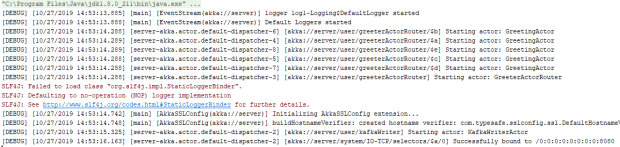
Then open your browser and type http://localhost:8080/check/health or use curl. You will see the “OK” response in your window:

Nex open any HTTP client or use curl to create an HTTP POST request to the
http://localhost:8080/check/writer with the following Json body:
{
	"name":"Alex",
	"surname":"Sergeenko"
}
And you will get the following response:

Next, check your Kafka with any available monitoring tool (the Kafka Tool for an instance) and check the contents of the greetings_topic:
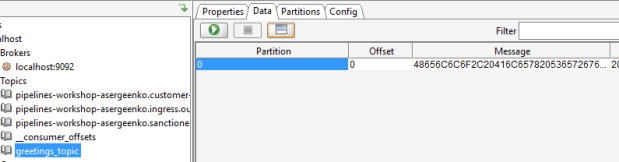
As it comes from the screenshot the topic now contains a new message.
Conclusion
In this tutorial, we’ve walked through some basic examples of Akka (HTTP) and Alpakka. It also covers some basics of routing in Akka HTTP and Akka actors routing. The whole project can be found on GitHub.